How to Improve Typing Speed
A practical progression for increasing speed without sacrificing accuracy.
Read full guideAZ Typing is a lightweight typing resource built around better technique, cleaner practice and useful guidance. Learn the habits that turn regular keyboard use into confident, accurate typing.
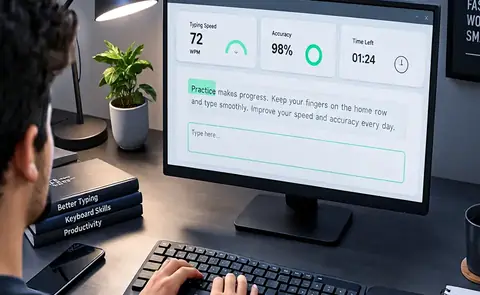
Choose a time and a level, then type the passage in the box. The clock starts on your first keystroke.
How the AZ Typing test works: five characters count as one word. Net speed counts only the words you typed correctly, and a word with any mistake counts as one error. Switch off backspace to practise under exam-style conditions, where mistakes cannot be corrected. Your best score is saved only in this browser.
Jump directly to the most useful parts of the site.
Return to the top of the AZ Typing homepage.
Check your speed and accuracy in the browser.
Read practical typing lessons and advice.
Get quick answers to common questions.
Small habits that improve daily practice.
Explore the learning-focused layout.
Save time with useful key combinations.
Learn what AZ Typing is for.
What the site is for, how it is organised and where the typing test fits in.
AZ Typing is designed as a focused home for people who want to become faster, more accurate and more confident at the keyboard. The goal is simple: remove distractions, explain the fundamentals clearly, and give learners practical ideas they can apply during everyday typing practice. Whether you are starting from the home row, preparing for a timed typing test, or trying to make your existing speed more consistent, the site keeps the learning path straightforward.
Typing is not only about pressing keys quickly. Good typing combines accuracy, rhythm, finger placement, visual focus and repeatable technique. A learner who rushes into high speed while making frequent errors often has to slow down later to rebuild habits. AZ Typing therefore treats speed as the result of controlled practice rather than a target that should be chased at any cost. Small improvements repeated over time are easier to maintain and usually produce a more reliable typing style.
The resource is organized around short, useful sections. You can move from the basics to practice methods, keyboard habits, exam-oriented preparation, shortcuts and progress tracking without opening a complicated dashboard. The quick links near the top help you jump to the area you need, while the Guide section provides deeper articles for learners who want a structured explanation before they practice.
You can practise right here. The AZ Typing test near the top of this page runs in your browser, with a timer, three levels and an exam-style option that switches off backspace. There is nothing to download or install, and everything else on this site is guidance around that practice.
The layout keeps the most useful learning ideas close together, so you can move from explanation to practice without unnecessary steps.
Use clean, repeatable keystrokes before pushing for more speed. Fewer corrections make your rhythm more stable and reduce mental load.
Timed practice feels different from casual typing. Learn to manage focus, scrolling, punctuation and pressure before the real test.
Track useful signals such as words per minute, accuracy and consistency rather than relying on a single best score.
Three short stages that fit into ten to twenty minutes and give every session a purpose.
A productive typing session does not need to be long. A short routine performed regularly can be more useful than an occasional marathon session. Start with one minute of comfortable typing to warm up your hands. Then spend a few minutes on accuracy-focused text, where the goal is to make very few errors. Finish with a timed passage at a controlled pace.
During practice, keep your shoulders relaxed, sit close enough that your elbows remain comfortable, and avoid looking down at the keyboard whenever possible. When a mistake occurs, notice the key or word that caused it instead of immediately accelerating to compensate. Your aim is to teach your fingers a dependable movement pattern.
Speed that lasts comes from movements your fingers can repeat without thinking.
Touch typing works because your fingers learn where common keys live. Once the movements become familiar, your eyes can remain on the text instead of constantly searching for individual keys. That frees attention for spelling, punctuation, sentence structure and the meaning of what you are writing.
Finger placement also matters for endurance. Reaching repeatedly with one finger can create awkward movement and inconsistent timing. A balanced technique spreads work across the hands and makes repeated practice more comfortable. The exact layout can vary between keyboards and languages, but the principle stays the same: build predictable movements and let speed develop from them.
Use the Guide articles below for focused lessons on speed, accuracy, posture, keyboard layouts and exam preparation.
The AZ Typing test runs in your browser, so there is nothing to download or install. Choose a time and a level and begin.
Before you start, pick one goal from the tips on this page, such as cleaner punctuation or a steadier rhythm, so that your first session has a purpose. Come back to the guides whenever a result raises a question.
Simple habits are easier to keep than complicated rules. Pick two or three and use them consistently.
Your fastest one-minute result is not always your useful working speed. Train at a pace where your accuracy remains dependable.
Learn the resting position of your fingers and return to it naturally. This reduces random hand movement and makes unfamiliar words easier.
Numbers, commas, quotation marks and symbols can slow down otherwise good typing. Include them in longer practice passages.
Try to keep your eyes a few characters or words ahead of your fingers. This gives your hands time to prepare the next movement.
If the same letter combination causes errors, isolate it for a few minutes rather than repeating the entire passage mindlessly.
After a test, identify what actually went wrong: speed, accuracy, posture, unfamiliar words, punctuation or concentration.
Different goals need slightly different practice, but the fundamentals stay the same.
Efficient typing can make writing assignments, notes, emails and documents less tiring. Focus on comfortable technique and accuracy first. When you can type common words without consciously searching for keys, your attention can shift toward ideas and organization. This is especially useful for long writing sessions where repeated corrections can break concentration.
Use realistic material: paragraphs, notes, emails or subjects you actually write about. Familiar vocabulary helps you measure raw technique, while unfamiliar text reveals how well your fingers and eyes coordinate under pressure.
Exam preparation should include the exact constraints that matter to your target test. That can mean a fixed time, a particular passage style, a required accuracy level, limited backspace behavior or a specific screen layout. The closer practice is to the real conditions, the less mental energy is spent adapting on exam day.
Do not measure success only by gross speed. A lower speed with strong accuracy can be more useful than a higher speed full of errors. Build a stable baseline, then increase the pace in small steps.
A simple path keeps your attention on the skill rather than the website itself.
If you are new to typing practice, begin with the basics: comfortable posture, a stable home-row position and accurate keystrokes. If you already type regularly, choose the problem you notice most often. It might be repeated spelling errors, slow punctuation, uneven rhythm, or a drop in accuracy when the timer starts.
Pick one problem for a short practice block. Trying to fix everything at once makes it difficult to tell which habit is helping. A focused session also makes improvement easier to notice. When one skill becomes more comfortable, move to the next.
The Guide page contains nine articles rather than one long manual. That is intentional. Open the article that matches your goal, read the core idea, and then put it into practice. You do not need to memorize every recommendation before you begin.
A typing result can change from one attempt to another because of text difficulty, fatigue, concentration or unfamiliar words. Instead of treating your best score as the only meaningful result, compare several similar sessions. If your average accuracy improves while your speed stays steady, that can be useful progress. If both improve gradually, your technique is becoming more efficient.
Keep a small weekly record with three numbers: typical speed, typical accuracy and practice minutes. Add one sentence about what felt difficult. This turns practice into a feedback loop and prevents random testing from becoming the entire routine.
Take thirty seconds after a test to ask what caused the mistakes. Were you rushing? Did one letter combination feel awkward? Did punctuation interrupt your rhythm? Was your posture uncomfortable? A clear answer gives the next session a purpose. Consistent review is one of the simplest ways to make practice more deliberate.
Three quick reads are shown here. Open the full Guide page to see all nine articles.
A practical progression for increasing speed without sacrificing accuracy.
Read full guideLearn why clean keystrokes and error review make faster typing sustainable.
Read full guideA simple routine covering warm-ups, drills, timed tests and review.
Read full guideShort answers to the questions learners ask most often.
Take the typing test near the top of this page to find your current speed and accuracy. Then read the short fundamentals, open a Guide article that matches your goal and repeat the test to check your progress.
Yes. AZ Typing includes a free typing test with a timer, three levels and an exam-style option that disables backspace, alongside guides and tips for study, work and competitive-exam preparation.
You can improve steadily, but useful speed usually comes from consistent practice rather than a single shortcut. Accuracy, finger familiarity and regular timed sessions work together.
Accuracy should lead. Once errors are under control, gradually increase pace while keeping the same relaxed technique.
A focused 10–20 minute session can be enough for many learners. Consistency matters more than very long sessions, especially when you are building new finger habits.
For most sustained computer work, touch typing is more efficient because your eyes can stay on the text. It also reduces the need to search for keys repeatedly.
Slow down and isolate the difficult letter combination. Repeat it accurately several times, then return to a normal-speed passage.
Practice under the same timing and text conditions you expect in the exam. Track both speed and accuracy, and include punctuation or special rules that your target test uses.
No. The AZ Typing test runs in your browser, so there is nothing to download or install.
Five characters count as one word. Net speed counts only the words you typed correctly, gross speed counts everything you typed, and a word with any mistake is counted as one error.